Best POS Systems for Small Businesses (2026 Guide)
Looking for the best POS system for your small business in 2026? Learn what features matter most for restaurants, cafes, and retail stores, and see why OperoPOS is a strong free option
By OperoPOS Team · 2026-05-11
Best POS Systems for Small Businesses (2026 Guide)
Choosing the right POS system in 2026 is one of the most important decisions for a small business. Your POS is no longer just a cash register. It is the place where orders, payments, staff, inventory, delivery, online sales, and reports come together.
For restaurants, cafes, and retail stores, the best POS system should help you sell faster, reduce mistakes, understand your numbers, and manage daily operations without adding unnecessary cost or complexity.
This guide explains what to look for in a small business POS system, which features matter most, how to compare your options, and why OperoPOS is a strong choice for businesses that want a modern, cloud-based POS without monthly fees.
Ready to try OperoPOS? Start with a free POS system built for restaurants, cafes, and retail stores. No credit card required. |
|---|
What Is a POS System?
A POS system, or point-of-sale system, is the software and setup a business uses to take orders, accept payments, track sales, and manage operations. In the past, a POS system was mostly a register. Today, a good POS system should connect the front counter, online ordering, delivery, reporting, team access, and daily cash reconciliation.
For a small business, this matters because every sale creates operational data. If your POS is simple and connected, you can see what is selling, who is working, which branch is performing, and where money is coming from. If your POS is slow or disconnected, your team ends up relying on manual notes, spreadsheets, and guesswork.
What Makes the Best POS System for Small Businesses in 2026?
The best POS system for a small business in 2026 should be fast enough for daily sales, flexible enough for your business model, and clear enough for your team to use without heavy training. It should also be affordable, especially for new businesses that need to control costs.
- Fast order entry with a clean cashier interface.
- Online ordering for pickup, delivery, and dine-in ordering.
- Product catalog management with categories, variants, modifiers, VAT, and stock controls.
- Multi-branch management for businesses with more than one location.
- Real-time reports so owners can see sales, revenue, order sources, and session summaries.
- Team roles and permissions for owners, managers, cashiers, kitchen staff, drivers, and viewers.
- Cashier session tracking with starting cash float and end-of-day reconciliation.
- Cloud access so your business data is available from anywhere.
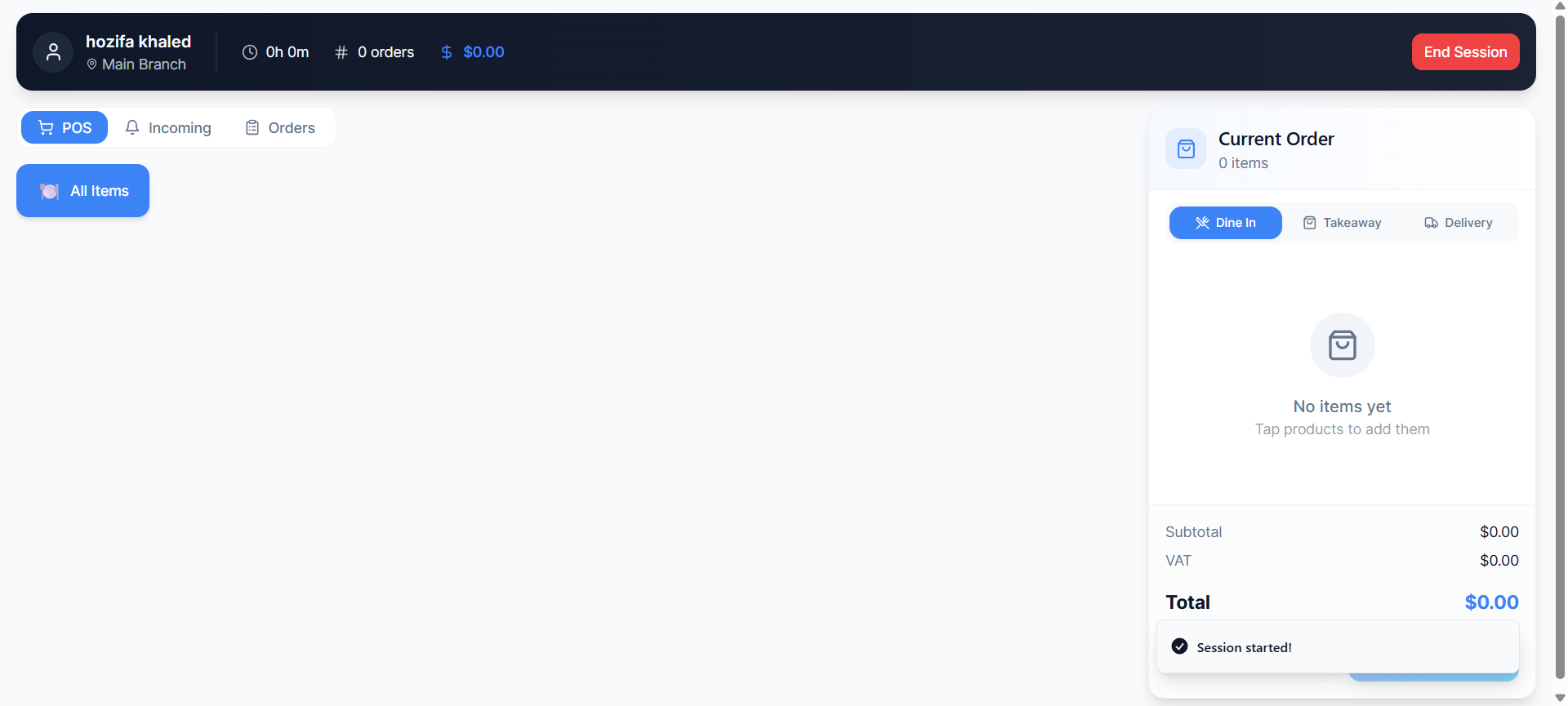
OperoPOS POS screen with current order view, dine-in, takeaway, delivery, and payment options.
Best Overall POS System for Small Businesses: OperoPOS
OperoPOS is a modern cloud-based POS system built for restaurants, cafes, and retail stores. It combines point-of-sale, online ordering, delivery management, team roles, multi-branch controls, cashier sessions, and real-time reports in one platform.
The biggest advantage for small businesses is that OperoPOS is free to use. There are no monthly fees, no hidden fees, and no credit card required to get started. That makes it especially useful for businesses that want professional POS software without taking on another fixed monthly cost.
OperoPOS is a strong fit if you want:
- A free POS system with no monthly software cost.
- A cashier interface that is simple for staff to learn.
- Built-in online ordering instead of relying only on third-party platforms.
- Multi-branch controls as your business grows.
- Reports that help you understand revenue, order sources, products, and sessions.
- Support for restaurants, cafes, retail stores, delivery, pickup, and dine-in ordering.
Try OperoPOS for free Set up your store, add products, invite your team, and start selling from one cloud-based POS system. |
|---|
POS System Comparison Checklist
Before choosing a POS system, compare the features that affect daily operations. Price matters, but the real question is whether the system helps your team sell faster and manage the business more clearly.
Feature | Why it matters | What to look for |
|---|---|---|
Fast order entry | Cashiers should move quickly during rush hours. | Large buttons, search, product categories, touch-friendly layout |
Online ordering | Customers expect direct ordering for pickup and delivery. | Branded ordering page, real-time sync, mobile-ready checkout |
Inventory and catalog | Your menu or product list should stay organized. | Variants, modifiers, VAT, stock tracking, categories |
Multi-branch control | Growing businesses need one view across locations. | Branch-specific teams, products, settings, and reports |
Reports | Owners need clear numbers, not manual spreadsheets. | Revenue, top products, payment methods, exports, sessions |
Roles and security | Different team members need different access. | Owner, manager, cashier, kitchen, driver, viewer permissions |
Cashier sessions | End-of-day reconciliation needs to be clean. | Starting cash float, shift logs, session summaries |
Delivery management | Delivery adds complexity fast. | Zones, pricing, driver assignment, order tracking |
1. Speed and Ease of Use
A POS system is used during the busiest moments of the day. If the screen is crowded, slow, or confusing, staff make mistakes and customers wait longer. A good POS should make the most common actions obvious: choose an item, select dine-in or takeaway, add the order, take payment, and move on.
For restaurants and cafes, this is especially important during rush hours. Your cashier should not need to click through five screens to complete a simple order. For retail stores, product search and category navigation should feel quick and natural.
2. Online Ordering Built In
In 2026, online ordering is no longer only for large chains. Small restaurants, cafes, and local shops need a way for customers to order directly from their phone. This can reduce phone calls, improve order accuracy, and create a more professional customer experience.
The best small business POS systems should support online ordering for delivery, pickup, and dine-in. Even better, orders should sync with the POS in real time so staff do not need to copy orders from one system into another.
OperoPOS includes a branded online ordering website, which means customers can place orders directly while the business keeps control of the order flow.
3. Product Catalog, Modifiers, VAT, and Stock
Your POS should make it easy to organize what you sell. Restaurants and cafes often need categories, sizes, add-ons, and modifiers. Retail stores need products, stock, VAT, and clear item organization.
A weak catalog creates confusion. A strong catalog keeps orders accurate and makes reporting more useful. Look for a POS system that supports product categories, variants, modifiers, VAT tracking, and real-time stock management.
4. Cashier Sessions and Shift Tracking
Cashier session tracking helps businesses manage shifts clearly. Instead of guessing what happened during the day, you can track who started a session, what cash float was entered, how much was sold, and how the session ended.
This is useful for accountability, reconciliation, and daily closing routines. It also helps owners understand performance by user or shift.
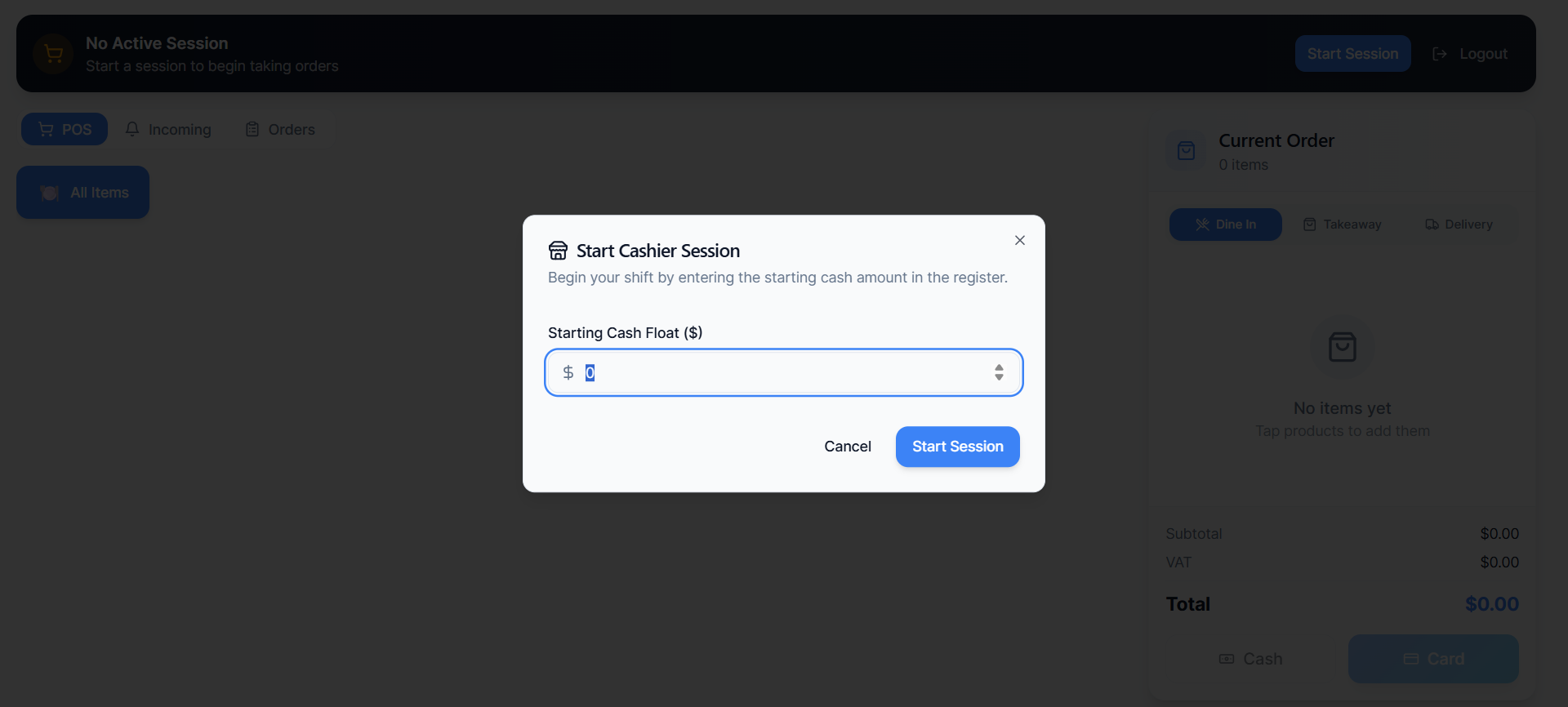
OperoPOS cashier session modal where staff enter the starting cash float before taking orders.
5. Reports and Analytics
A POS system should help you answer basic business questions quickly: How many orders did we process? How much revenue did we make? Which order sources are performing? Which sessions were active? Which staff members handled sales?
Reports should be easy to filter and export. Small businesses do not always need complex dashboards, but they do need clear numbers that are available when decisions need to be made.
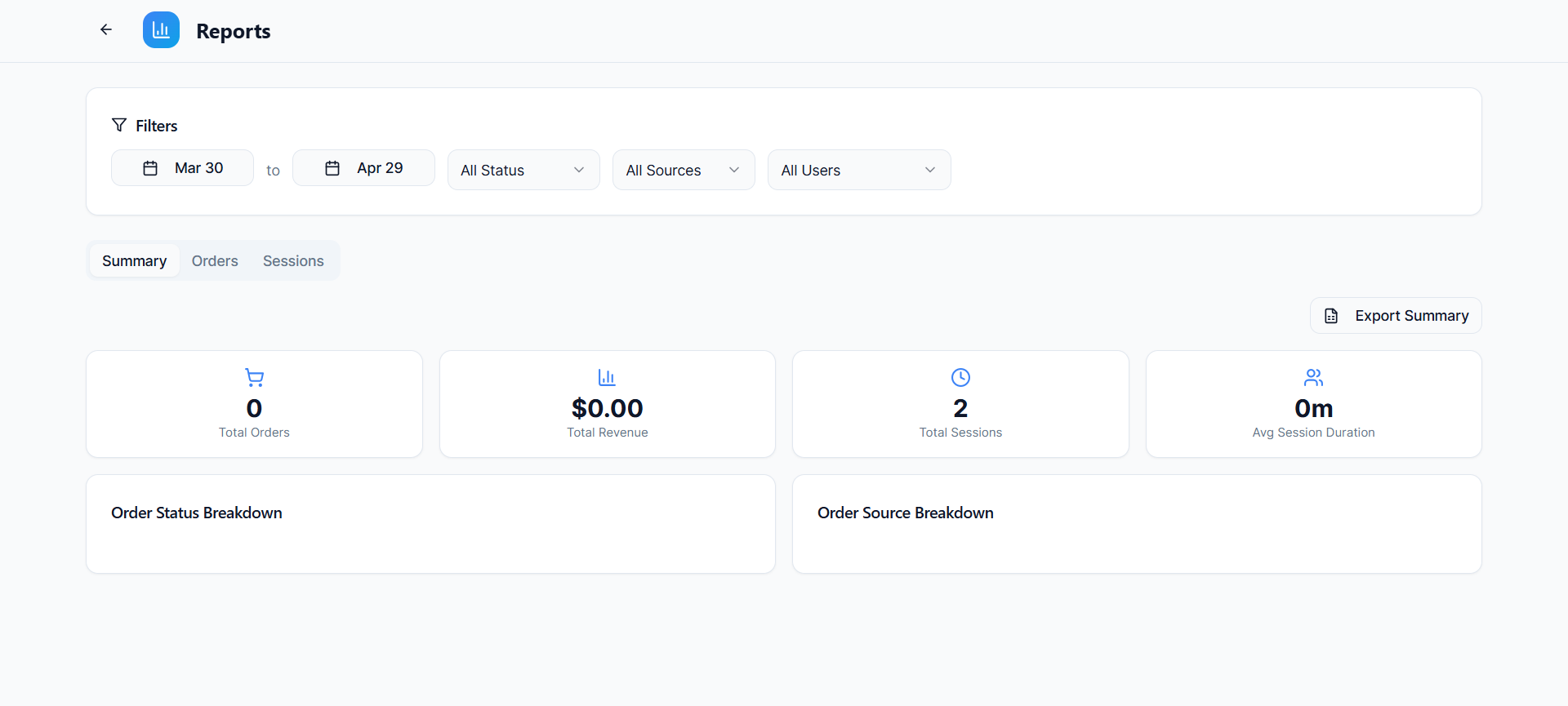
OperoPOS reports dashboard with date filters, order totals, revenue, sessions, and breakdown sections.
6. Multi-Branch Management
Even if you only have one branch today, your POS should not block future growth. Multi-branch management allows you to control different locations from one dashboard while keeping branch-specific products, teams, and settings.
This is helpful for restaurants with more than one location, retail stores opening new branches, or owners managing different brands or concepts. OperoPOS includes multi-branch management, which makes it easier to scale without changing systems later.
7. Team Roles and Permissions
Not every team member should have access to every setting. A cashier may need to take orders, a manager may need to view reports, a kitchen user may need to see incoming orders, and an owner may need full control.
Good POS software includes role-based permissions so the business can stay organized and secure. OperoPOS supports multiple roles, including owner, admin, manager, cashier, kitchen, driver, and viewer.
8. Delivery Management
Delivery can create operational complexity. Businesses need to know which orders are for delivery, which drivers are assigned, what zones are available, and how pricing works by zone.
A POS with built-in delivery management helps reduce confusion between the cashier, kitchen, driver, and customer. OperoPOS supports delivery zones, driver assignment, real-time order tracking, and zone-based pricing.
9. Cloud Access and Mobile Readiness
Cloud-based POS systems are popular because they make business data easier to access. Owners can check the dashboard without being physically inside the store. Teams can work from tablets, laptops, or other connected devices depending on the setup.
For a small business, this reduces the need for complicated local infrastructure. It also makes updates easier because the software can improve over time without manual installation.
Best POS System by Business Type
The right POS system depends on how your business sells. A restaurant needs order types and modifiers. A cafe needs speed. A retail store needs products, stock, and reporting. A delivery-focused business needs online ordering and driver workflows.
Type of business | Best POS setup | Must-have features | Why OperoPOS fits |
|---|---|---|---|
Small restaurant | Cloud POS with dine-in, takeaway, and delivery | Order types, modifiers, payment tracking, cashier sessions | The POS screen supports dine-in, takeaway, delivery, cash/card payments, and current order tracking. |
Cafe | Fast touch-based POS | Quick item selection, session tracking, simple reports | The cashier interface is designed to process orders quickly with a clean layout. |
Retail store | Product catalog and reporting focused POS | Products, categories, VAT, stock, user roles | OperoPOS includes smart catalog management, VAT tracking, and real-time reports. |
Multi-location business | Central dashboard with branch controls | Branch-specific products, teams, settings, analytics | OperoPOS includes multi-branch management from one dashboard. |
Delivery-first business | POS with online ordering and delivery zones | Online ordering, delivery zones, driver assignment, source reports | OperoPOS includes a branded ordering website and delivery management features. |
How to Choose the Right POS System for Your Small Business
Use this simple decision process before committing to a POS system:
- Write down your main order types: dine-in, takeaway, delivery, pickup, online, or retail checkout.
- List the daily actions your team repeats most often.
- Check whether the POS can support products, categories, modifiers, VAT, stock, and payment methods.
- Confirm that reports are clear enough for you to use every week.
- Make sure the system supports your team structure with roles and permissions.
- Check the real monthly cost, including software fees, transaction charges, setup costs, and add-ons.
- Test the system with a real order flow before relying on it during a busy shift.
Free POS vs Paid POS: Which Is Better?
A paid POS system can make sense for larger businesses with very specific requirements. However, many small businesses do not need to start with expensive software. The better question is whether the POS system includes the features you need without creating hidden costs or operational friction.
A free POS system is a strong option when it includes the essentials: order taking, online ordering, catalog management, reports, team roles, delivery, payments, and multi-branch controls. OperoPOS is designed around this idea by offering every core feature at no monthly cost.
Why OperoPOS Is a Strong Choice for 2026
OperoPOS stands out because it gives small businesses the tools they usually expect from a paid POS system while keeping the software free. It is built for real daily operations, not only for taking payments.
- Free to use with no credit card required.
- Designed for restaurants, cafes, and retail stores.
- Supports dine-in, takeaway, delivery, and online ordering.
- Includes multi-branch management for growing businesses.
- Includes real-time reports and exportable session summaries.
- Supports cashier sessions with starting float and reconciliation.
- Includes team roles, permissions, and secure cloud storage.
- Available in multiple languages, including English, German, French, Spanish, Italian, and Romanian.
Start selling with OperoPOS Create your account, set up your store, add your products, and begin taking orders in minutes. |
|---|
Final Verdict: What Is the Best POS System for Small Businesses in 2026?
The best POS system for a small business in 2026 is one that keeps daily operations simple while giving owners better control over sales, orders, staff, reports, and growth. For restaurants, cafes, and retail stores, that means choosing a system with fast order entry, online ordering, catalog management, multi-branch support, delivery workflows, cashier sessions, and clear analytics.
OperoPOS is a strong choice because it brings those tools together in one free cloud-based platform. For small businesses that want to sell faster, manage orders more clearly, and avoid unnecessary monthly software costs, OperoPOS is a practical place to start.
Frequently Asked Questions
What is the best POS system for a small business?
The best POS system for a small business is one that matches the way the business sells. Restaurants and cafes should look for fast order entry, dine-in, takeaway, delivery, online ordering, modifiers, and cashier sessions. Retail stores should look for product catalogs, stock tracking, VAT, reports, and user roles. OperoPOS is a strong free option for restaurants, cafes, and retail stores.
Is a free POS system enough for a small business?
A free POS system can be enough if it includes the core features your business needs. OperoPOS includes POS, online ordering, delivery management, team roles, reports, cashier sessions, and multi-branch management without monthly fees.
Can I use OperoPOS for a restaurant or cafe?
Yes. OperoPOS is built for restaurants, cafes, and retail stores. It supports dine-in, takeaway, delivery, online ordering, cashier sessions, and order management.
Does OperoPOS support online ordering?
Yes. OperoPOS includes a branded customer ordering website for delivery, pickup, and dine-in orders.
Can I manage multiple branches with OperoPOS?
Yes. OperoPOS supports multi-branch management, including branch-specific products, teams, and settings.
Does OperoPOS work on mobile devices?
OperoPOS is cloud-based and mobile-ready, so teams can access the system from connected devices.
Do I need a credit card to start using OperoPOS?
No. OperoPOS does not require a credit card to get started.
#POS system #small business POS #restaurant POS #cafe POS #retail POS #POS software 2026