Best POS for Coffee Shops: 2026 Guide
Compare the best POS systems for coffee shops in 2026. Learn what cafes need, how OperoPOS compares with Square, Toast, Clover, Lightspeed, Shopify POS, Loyverse, and TouchBistro, and how to choose the right system.
By OperoPOS Team · 2026-05-14
Best POS for Coffee Shops: 2026 Guide
Choosing the best POS for a coffee shop is one of the most important decisions a cafe owner can make. Coffee shops move fast. One customer wants an espresso to go, another wants a cappuccino with oat milk, another orders online for pickup, and your team still needs to track payments, stock, shifts, and daily sales.
A good coffee shop POS system should make every part of that flow easier. It should help your team take orders quickly, reduce mistakes, manage dine-in, takeaway, and delivery, and understand what is actually selling. For small cafes, it also needs to be affordable. Ideally, it should let you start without a heavy monthly cost or complex setup.
In this guide, we compare the best POS systems for coffee shops in 2026, including OperoPOS, Square, Toast, Clover, Lightspeed, Shopify POS, Loyverse, and TouchBistro. We will also explain what features matter most for cafes and why a free cloud POS can be a smart starting point for new and growing coffee businesses.
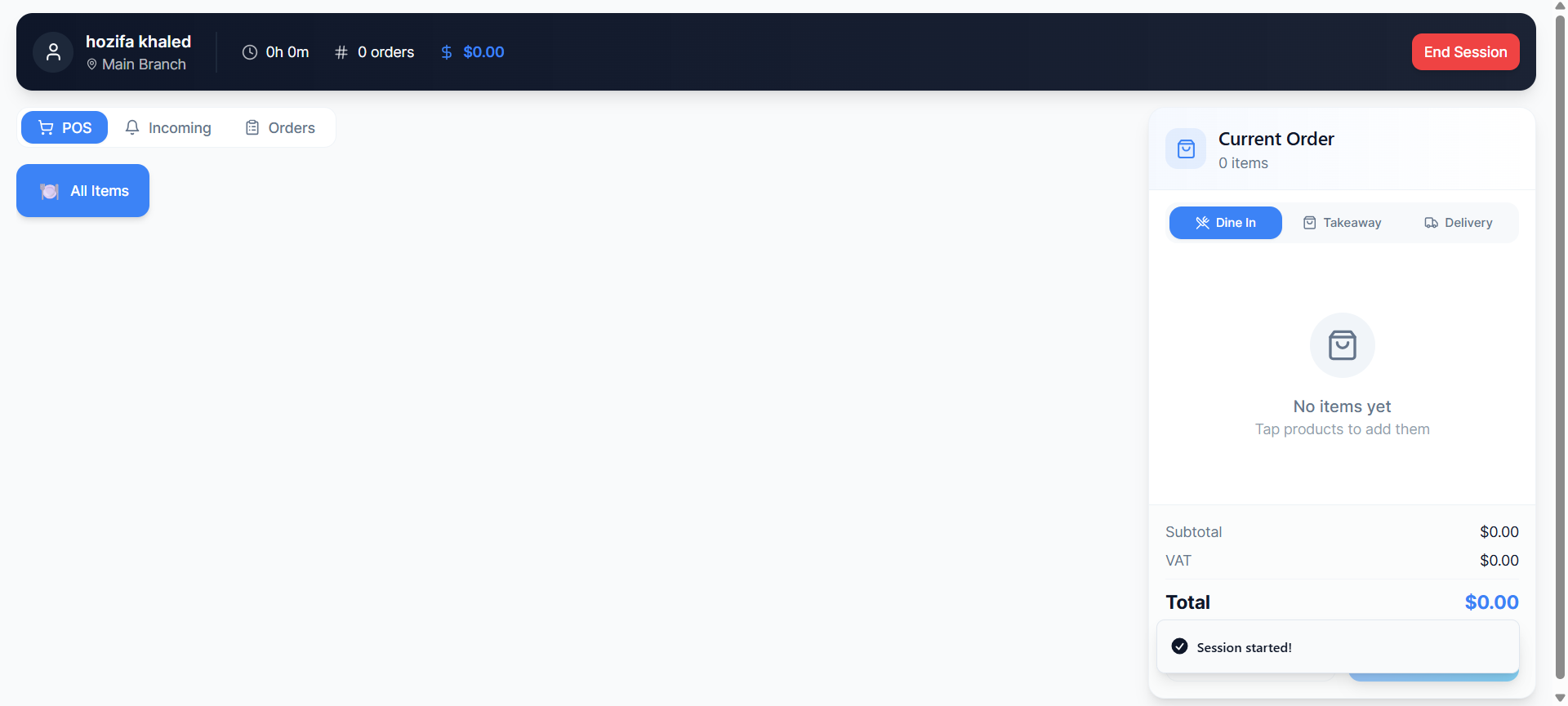
OperoPOS cashier screen for dine-in, takeaway, delivery, and fast order taking.
Table of contents What coffee shops need from a POS system Quick comparison: best coffee shop POS systems Best overall choice for small cafes: OperoPOS Detailed comparison with major POS systems How to choose the right cafe POS FAQs about coffee shop POS systems |
What Coffee Shops Need From a POS System
Coffee shops are different from many other small businesses. The average ticket may be small, the pace is high, and customers expect quick service. That means your POS needs to support speed, accuracy, and simple daily management.
The best coffee shop POS software should help with:
- Fast order entry for rush hours and morning queues.
- Product modifiers for milk types, cup sizes, syrups, extras, and add-ons.
- Dine-in, takeaway, delivery, and pickup order types.
- Online ordering so customers can order from their phone.
- Cashier session tracking to manage opening float, closing cash, and shift accountability.
- Real-time reports for revenue, order sources, payment methods, and popular products.
- Multi-branch management for owners with more than one cafe location.
- Team roles and permissions so cashiers, managers, kitchen staff, and owners see the right tools.
- Simple setup with minimal training for part-time staff and new hires.
Quick Comparison: Best POS Systems for Coffee Shops in 2026
Here is a practical comparison of popular POS systems for coffee shops. The right choice depends on your budget, country, hardware needs, online ordering requirements, and how much control you want over your daily operations.
POS System | Best For | Key Strengths | Potential Limitation | Best Fit |
OperoPOS | Small cafes, restaurants, and retail stores that want a free cloud POS | Free POS, online ordering, delivery, multi-branch, team roles, reports, cashier sessions | Newer brand, so it may have fewer third-party integrations than older enterprise systems | Best free all-in-one option for cost-conscious cafes |
Square | Cafes that want strong payment tools and simple setup | Fast checkout, online ordering options, reporting, hardware ecosystem | Availability and pricing vary by country, and some advanced features can add cost | Good for cafes in supported markets that want payments first |
Toast | US-based restaurants and cafes with restaurant-heavy workflows | Restaurant POS, payments, order and operations tools, cafe and bakery focus | May be more than a small cafe needs, especially outside the US | Good for established food service operators |
Clover | Coffee shops that want packaged hardware and payment tools | Coffee shop POS packages, payments, loyalty, reporting, hardware options | Often tied to hardware and merchant service setup | Good for cafes that want a hardware-led POS package |
Lightspeed | Growing cafes that need strong inventory and restaurant management | Restaurant POS, inventory, reporting, insights, payments, order tools | Can be more complex and costly for very small cafes | Good for multi-location or inventory-focused cafes |
Shopify POS | Coffee brands that sell retail products and online store items | Strong retail and ecommerce connection, inventory, checkout, customer data | Food service workflows may need apps or custom setup | Good for coffee roasters and retail-first cafes |
Loyverse | Very small cafes wanting a free mobile POS app | Free basic POS, items, sales, analytics, cafe support | Some back-office features and employee tools are paid add-ons | Good for simple setups and early-stage cafes |
TouchBistro | Restaurants and cafes that want an iPad-based restaurant POS | Restaurant POS, reporting, staff tools, tableside ordering, online ordering options | Pricing and setup may be heavier than a free POS | Good for service-heavy cafes and restaurants |
Best Overall for Small Coffee Shops: OperoPOS
OperoPOS is a strong choice for small coffee shops, cafes, bakeries, quick-service restaurants, and retail stores that want a modern POS without paying a monthly subscription. It is designed as a cloud-based system with a touch-friendly cashier interface, online ordering, delivery management, multi-branch support, team roles, and real-time reports.
For a coffee shop owner, the biggest advantage is simple: you can start with the core tools you need without paying software fees. This matters for new cafes, independent coffee shops, and small business owners who want to keep costs low while they validate demand, train staff, and build repeat customers.
OperoPOS is especially useful if your cafe needs:
- A fast POS screen for walk-in coffee orders.
- Order types for dine-in, takeaway, and delivery.
- A branded online ordering website for pickup or delivery.
- Cashier sessions with starting float and end-of-day reconciliation.
- Reports for revenue, order status, order source, and session performance.
- Multi-branch management if you open more than one cafe.
- Team roles for owners, admins, managers, cashiers, kitchen staff, and viewers.
- Multi-language support for international markets, including Europe.
Ready to run your coffee shop with a free POS system? Start with OperoPOS and manage orders, delivery, reports, and cashier sessions from one cloud dashboard.
Why Free POS Software Matters for Coffee Shops
Coffee shop margins can be tight. Rent, coffee beans, milk, packaging, salaries, delivery costs, and payment fees all add up. Paying for a POS before your cafe has stable sales can put extra pressure on cash flow.
A free POS system gives small coffee shops room to grow. It helps you move away from paper orders, spreadsheets, and manual cash tracking while keeping your monthly software cost at zero. That means you can spend more on product quality, customer experience, staff training, and marketing.
This is especially relevant for cafes in emerging and competitive markets, including Romania and other European markets where many small businesses want simple digital tools without enterprise-level pricing.
Feature 1: Fast Order Taking for Morning Rush Hours
Morning rush is where a coffee shop POS proves its value. If the cashier screen is slow or confusing, the queue gets longer, staff feel pressure, and customers may leave. A good cafe POS should make repeat orders easy and keep the checkout process simple.
Look for a POS that supports large buttons, quick product selection, simple order types, and fast payment handling. OperoPOS has a touch-optimized cashier screen that separates POS, incoming orders, and order history, which keeps daily workflows easier to understand.
Feature 2: Modifiers for Real Coffee Orders
Coffee orders are rarely one-size-fits-all. A customer may ask for a small flat white with oat milk, an iced latte with vanilla syrup, or an extra shot. Your POS needs to handle variants and modifiers clearly so the cashier does not need to type manual notes for every order.
For cafes, modifiers can include:
- Cup size: small, medium, large.
- Milk option: dairy, oat, almond, soy, lactose-free.
- Temperature: hot or iced.
- Extras: syrup, whipped cream, extra shot, decaf.
- Food add-ons: pastry, sandwich, cookie, bottled drink.
A POS with a smart product catalog makes your menu easier to manage and helps reduce mistakes at the counter.
Feature 3: Online Ordering for Pickup and Delivery
Online ordering is no longer only for large restaurants. Coffee shops can use online ordering for pickup orders, office coffee runs, pastry boxes, catering, and delivery. The key is having the online order flow connected to the POS so staff do not need to copy orders manually from messages or phone calls.
OperoPOS includes a branded customer website for delivery, pickup, and dine-in orders. For cafes, that means customers can order directly from their phone, and the business can keep more control over the customer experience.
Feature 4: Reports That Show What Is Actually Working
Many coffee shop owners know their business by feeling. That helps, but data gives better decisions. A POS report can show best-selling products, order sources, revenue, session activity, and customer demand patterns.
For example, if iced lattes sell more in the afternoon, you can prepare staff and stock accordingly. If takeaway orders are growing faster than dine-in, you can adjust packaging, pickup flow, and menu layout.
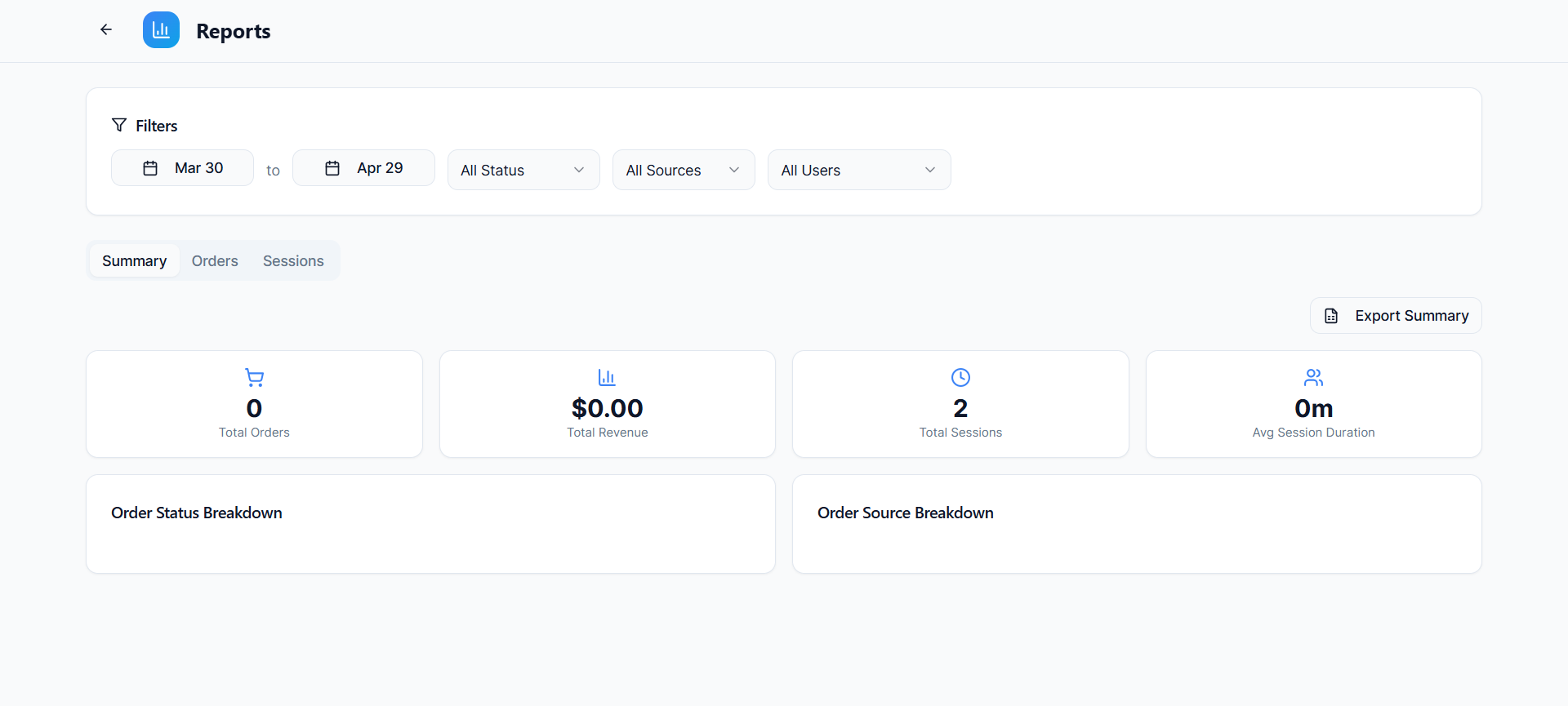
OperoPOS reports dashboard showing revenue, sessions, order status, and order source breakdown areas.
A strong POS reporting dashboard helps cafe owners answer practical questions:
- Which products sell best?
- How much revenue did we make today?
- How many sessions were opened?
- Which channel generated the most orders?
- Which cashier or branch needs support?
Feature 5: Cashier Sessions and End-of-Day Control
Cash control is a common problem in small cafes. If staff open and close shifts manually, it can be hard to understand cash differences, missing amounts, and daily performance. Cashier session tracking solves this by recording the starting cash float, active shift, orders, payments, and closing totals.
OperoPOS includes cashier sessions, which are useful for coffee shops that operate with multiple cashiers, morning and evening shifts, or more than one branch.
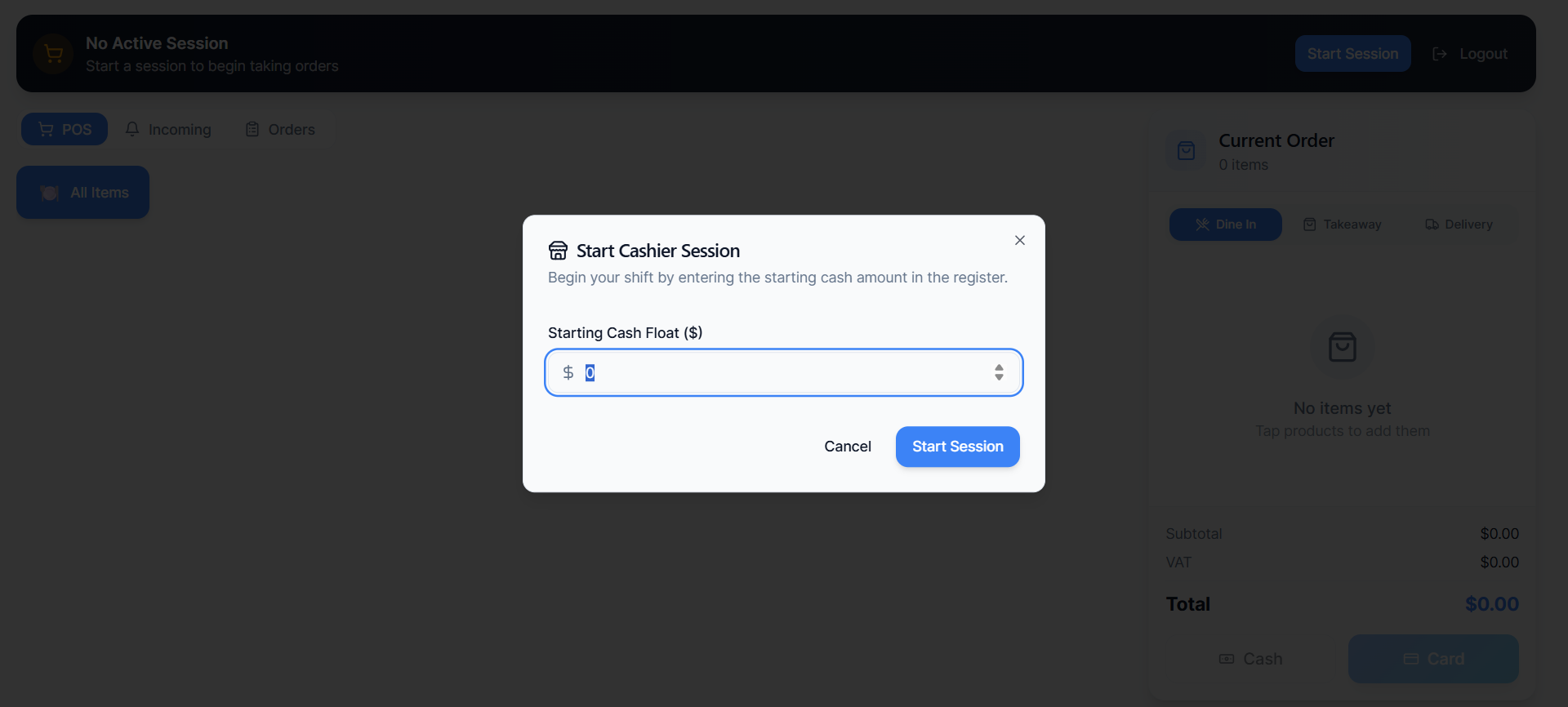
OperoPOS start cashier session modal for starting cash float before taking orders.
Detailed Comparison: OperoPOS vs Major POS Systems
OperoPOS vs Square for Coffee Shops
Square is a popular option for coffee shops because it combines POS, payments, reporting, and online ordering tools in supported markets. Square can be a good fit for cafes that want a payment-led setup with polished hardware and a wide ecosystem. OperoPOS is a better fit for cafes that want a free cloud POS with built-in online ordering, delivery, reports, multi-branch management, and cashier sessions without starting with monthly software cost.
OperoPOS vs Toast for Coffee Shops
Toast is built strongly around restaurants and offers a cafe and bakery-focused POS experience. It can suit established food businesses that want a restaurant platform with payment and operations tools. OperoPOS is easier to position for smaller cafes that want to launch quickly, avoid heavy setup, and keep software cost low while still getting online ordering, delivery management, and reports.
OperoPOS vs Clover for Coffee Shops
Clover offers coffee shop POS packages with hardware, payment processing, reporting, and loyalty features. It can work well for cafes that want a packaged device setup. OperoPOS is more attractive for owners who want a cloud system first, especially when they need free software, branch management, and flexible order handling without committing to a hardware-led package.
OperoPOS vs Lightspeed for Coffee Shops
Lightspeed is known for restaurant POS, inventory, payments, and detailed insights. It can be useful for more mature cafes with complex inventory or multiple locations. OperoPOS is a simpler and more cost-friendly choice for cafes that want the key daily tools first: POS, online ordering, delivery, reports, team roles, and cashier sessions.
OperoPOS vs Shopify POS for Coffee Shops
Shopify POS is strong for retail and ecommerce, especially if a coffee brand sells beans, merchandise, subscriptions, or online store products. For a classic coffee shop with dine-in, takeaway, delivery, cashier sessions, and branch operations, OperoPOS is more directly aligned with cafe and restaurant workflows.
OperoPOS vs Loyverse for Coffee Shops
Loyverse is a popular free POS option for cafes and small retailers, with useful basic tools and paid back-office add-ons. OperoPOS is also free and focuses on a broader all-in-one workflow with online ordering, delivery management, team roles, multi-branch support, reports, and cashier sessions.
OperoPOS vs TouchBistro for Coffee Shops
TouchBistro is a restaurant POS with menu, sales, staff, tableside ordering, and online ordering options. It can be a good fit for service-heavy restaurants and cafes. OperoPOS is a better starting point for small coffee shops that want a free, modern, cloud-based POS with less cost pressure.
How to Choose the Best POS for Your Coffee Shop
Before choosing a POS, think about your daily workflow. A beautiful system is not enough if it slows your staff down. The best cafe POS is the one your team can actually use during busy hours.
Use this checklist before making a decision:
- List your order types: dine-in, takeaway, pickup, delivery, and online ordering.
- Map your menu: drinks, sizes, milk options, add-ons, pastries, food, and bundles.
- Decide if you need inventory tracking for beans, milk, cups, packaging, and retail products.
- Check if you need multi-branch support now or in the next 12 months.
- Review how cashier shifts and daily cash reconciliation will be handled.
- Compare total cost, including software, hardware, payment processing, add-ons, and setup.
- Test the cashier screen with a real coffee order during a busy scenario.
- Choose a POS that gives you reports you can understand quickly.
Recommended POS Setup for a Small Coffee Shop
For a small independent cafe, a practical setup would include:
- One main cashier device at the counter.
- A clear product catalog with drinks, sizes, modifiers, and pastries.
- Online ordering for pickup and delivery.
- Cash and card payment tracking.
- Cashier session tracking for opening and closing shifts.
- Daily reports reviewed by the owner or manager.
- Team roles for cashiers, managers, and owners.
OperoPOS covers these core needs while keeping the software free, which makes it a strong starting point for coffee shops that want to move quickly and keep costs under control.
Best POS for Coffee Shops in Romania
If you are opening or running a coffee shop in Romania, you should look for a POS that is simple, cloud-based, and affordable. Many independent cafes need digital ordering, clear reports, and better shift control, but they may not want to start with expensive enterprise software.
A good Romania-ready coffee shop POS should support fast counter orders, clear reporting, online ordering, delivery workflows, and simple staff management. This helps cafe owners run daily operations more smoothly without relying on paper notes, manual spreadsheets, or disconnected ordering tools.
OperoPOS is suitable for international markets because it is cloud-based, mobile-ready, and supports multiple languages. This makes it useful for cafe owners who want a modern system that can grow with their business.
Final Verdict: What Is the Best POS for Coffee Shops?
The best POS for coffee shops depends on your stage and budget. Square, Toast, Clover, Lightspeed, Shopify POS, Loyverse, and TouchBistro all have strengths. Some are strongest for payment hardware, some for mature restaurant operations, and some for retail-first businesses.
For small coffee shops that want a free, modern, cloud-based POS with online ordering, delivery management, multi-branch support, reports, team roles, and cashier sessions, OperoPOS is one of the strongest options to consider in 2026.
If your cafe needs to serve customers faster, reduce manual work, and understand sales clearly, start with a POS that keeps the daily workflow simple. OperoPOS gives coffee shop owners the tools they need to take orders, manage shifts, track performance, and grow without adding monthly software cost.
Try OperoPOS Free
Run your coffee shop with a free POS system built for fast orders, online ordering, delivery, reports, cashier sessions, and multi-branch growth. Get started with OperoPOS today. No credit card required. |
FAQ: Coffee Shop POS Systems
What is the best POS system for coffee shops?
The best POS system for coffee shops is one that supports fast order taking, modifiers, online ordering, payments, reports, and shift tracking. OperoPOS is a strong option for small cafes because it combines these tools in a free cloud-based platform.
Can I use a free POS for a coffee shop?
Yes. A free POS can work well for small coffee shops if it includes the core tools you need, such as order taking, product management, cashier sessions, reports, and online ordering. OperoPOS is designed to provide these features without monthly software fees.
Do coffee shops need online ordering?
Online ordering is useful for cafes that offer pickup, delivery, office orders, or pre-orders. It helps reduce phone calls and gives customers a faster way to order.
What features should a cafe POS have?
A cafe POS should include fast checkout, product modifiers, cash and card support, order types, reports, staff roles, shift tracking, and ideally online ordering.
Is Square or Toast better for coffee shops?
Square can be a good option for cafes that want simple payments and supported hardware. Toast is stronger for restaurant-heavy operations. OperoPOS is a strong alternative for small cafes that want a free, cloud-based system with key daily operations included.
What is the best POS for a small coffee shop in Romania?
A small coffee shop in Romania should look for a cloud-based POS with low cost, simple setup, online ordering, and clear reports. OperoPOS is a good option to consider because it is free and built for cafes, restaurants, and retail stores.
#POS #Coffee Shops #Cafe Software #OperoPOS #Online Ordering #Restaurant POS